Introduction: Why Inclusive Design Matters
Imagine opening an app, but the text is too small to read. Or trying to book a ticket on a website, but the color contrast makes buttons invisible. For millions of people worldwide, these issues are a way of life.
Inclusive design isn’t just about meeting accessibility guidelines; it’s about creating products that can be used by all people, inspite their abilities, language, or context. In 2025, inclusive design is more than a trend; it’s becoming a global standard for digital products.
What Is Inclusive Design?
Inclusive design means building digital experiences that consider a wide range of users, whether they’re living with disabilities, experiencing short-term difficulties (like a broken arm), or situational limitations (like low internet or direct sunlight).
It’s not limited to accessibility; it goes beyond to cover:
- Physical accessibility (vision, hearing, mobility).
- Cultural and language diversity.
- Technological accessibility (low bandwidth, older devices).
- Situational limitations (background noise, one-handed use, glare).
In short, Accessibility is following the rules. Inclusive design is caring.
Why Inclusive Design Is a Global Trend
- Legal requirements – Countries like the US (ADA), UK (Equality Act), and India (Rights of Persons with Disabilities Act) push for accessible digital services.
- Bigger market reach – 15% of the world’s population lives with a disability; that’s over 1 billion people.
- Better user experience – Inclusive products tend to help all users (think subtitles on videos, helpful in noisy spaces too).
- Stronger brand reputation – Inclusively designed companies are regarded as customer-centric and socially conscious.
Principles of Inclusive Design
There are a few universal principles every designer should follow:
- Provide multiple ways to interact
- Keyboard navigation, voice control, touch, and mouse support.
- Example: Screen readers for visually impaired users.
- Keyboard navigation, voice control, touch, and mouse support.
- Design with contrast and clarity
- High-contrast color palettes for visibility.
- Legible text(minimum 16px font size).
- High-contrast color palettes for visibility.
- Offer flexibility and personalization.
- Dark mode, adjustable font sizes, captions on videos.
- Dark mode, adjustable font sizes, captions on videos.
- Use clear, simple language.
- Avoid jargon; keep CTAs descriptive (“Download Report” instead of “Click Here”).
- Avoid jargon; keep CTAs descriptive (“Download Report” instead of “Click Here”).
- Test with diverse users
- Don’t only test with your design team; include people from different backgrounds and abilities.
- Don’t only test with your design team; include people from different backgrounds and abilities.

Practical Steps to Make Your Product Accessible
Here’s a simple checklist to get started:
1. Start With Accessibility Standards
- Follow WCAG (Web Content Accessibility Guidelines).
- Ensure your site passes an accessibility audit (tools like WAVE, AXE).
2. Focus on Visual Design
- Minimum 4.5:1 contrast ratio for text.
- Use color + symbols together (don’t rely only on color).
- Make forms simple, with clear error messages.
3. Don’t Forget Multimedia
- Add captions and transcripts to videos.
- Provide alt text for all images.
- Use descriptive audio for visual-only information.
4. Write Inclusive Copy
- Use gender-neutral language.
- Keep sentences short for global readability.
- Avoid idioms that don’t translate globally.
5. Build & Test With Real People
- Run usability tests with people who have disabilities.
- Test on low internet connections & older devices.

Inclusive Design in Action: Real-World Examples
- Microsoft: Their “Inclusive Design Toolkit” is about designing for one person with unique needs → improving for all.
- Apple: VoiceOver, Magnifier, and accessibility shortcuts built into iOS.
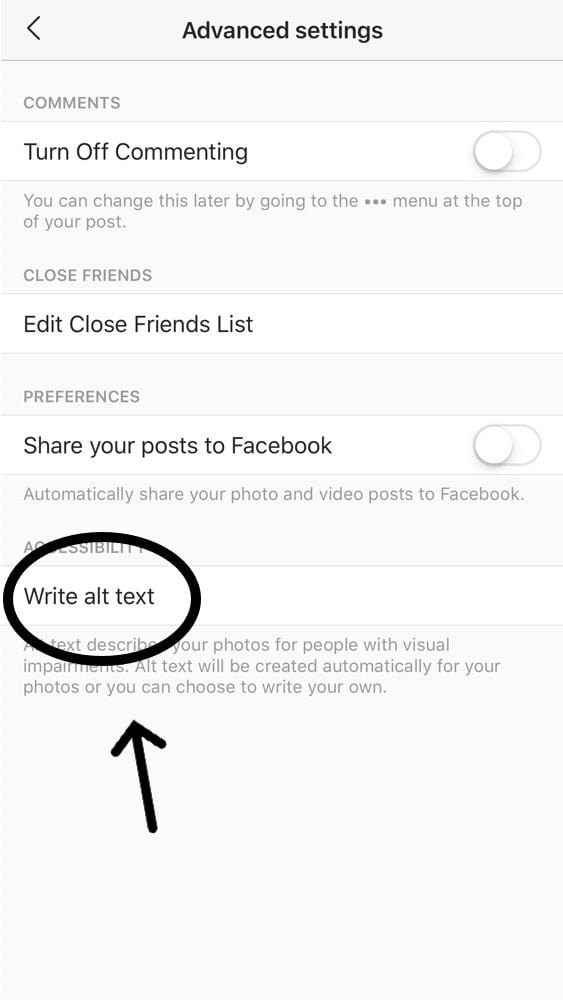
- Instagram: Auto-generated alt text for images to help visually impaired users.
Challenges Designers Face
- Balancing inclusivity with visual creativity.
- Lack of awareness or resources in small teams.
- Testing costs for accessibility across multiple devices/platforms.
The key is to start small: fix the basics (contrast, text size, alt text) and grow from there.
Conclusion: Designing for Everyone, Not the Few
Inclusive design is not only a design principle; it’s a responsibility. When you design for inclusivity, you’re not just following rules; you’re opening doors for millions of users.
The future of design is accessible, inclusive, and user-first. The question is: will your product be part of it?